
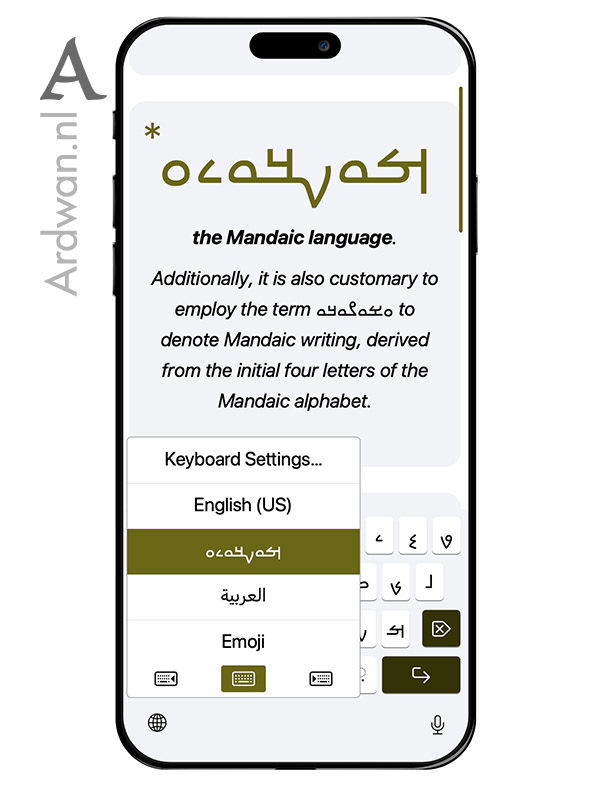
ࡌࡀࡍࡃࡀࡉࡀ in the iOS keyboard menu, between English (US) and العربية, named in the script it was made for.
There is a small piece of my work that has gone quietly into the world. If you turn on the Mandaic keyboard on an iPhone or an iPad, the words you see on the keys, the labels that change as the keyboard moves from a search field to a message field to a passcode, are mine. Apple needed Mandaic equivalents for the contextual words that sit on every keyboard layout in every language. I provided them. This was one part of what I worked on with Apple for iOS 17 and iPadOS 17, and the terms have been shipping on millions of devices since.
The keyboard menu itself lists the language as ࡌࡀࡍࡃࡀࡉࡀ. Press and hold the globe button and there it is, named in the script it was made for, sitting alongside עברית and ܣܘܪܝܝܐ as one more living tongue the device now speaks.
The script itself carries another customary name. Mandaeans call their writing ࡀࡁࡀࡂࡀࡃࡀ, abagada, built from the first four letters of the script, the same impulse that gave English the word abc.
And these are the fourteen words that move with the keyboard, one Mandaic term per English context.
Space: ࡓࡅࡄࡒࡀ. The label on the long bar at the bottom of every keyboard.
Return: ࡊࡓࡅࡊ. The default action key when no app has asked for something more specific.
Search: ࡁࡒࡅࡓ. What the return key becomes inside Maps, Spotlight, or any app that takes a query.
Go: ࡏࡆࡉࡋ. What it becomes in Safari and other places where you type an address and travel to it.
Send: ࡔࡃࡅࡓ. The label inside Messages, WhatsApp, Mail, anywhere you type something to a person.
Join: ࡋࡅࡐ. The label that appears when you enter a Wi-Fi password.
Cancel: ࡀࡄࡅࡃ. The lock-screen variant, when typing should be abandoned rather than completed.
Undo: ࡄࡑࡅࡁ. A dedicated key on the iPad keyboard, for stepping back.
Redo: ࡊࡌࡅࡓ. Its companion on the iPad, for stepping forward again.
Continue: ࡓࡃࡅࡀ. The label inside multistep flows, where pressing return carries you onward.
Done: ࡎࡅࡊ. The label that closes the keyboard once an action is finished.
Next: ࡎࡉࡈࡀࡓ. What appears when there are multiple form fields and pressing return moves you to the next one.
Route: ࡃࡉࡁࡓࡀ. The mapping-app label, where the return key turns an address into a route.
Emergency Call: ࡐࡑࡀࡕࡀ. The label on the emergency screen, the most consequential return key on any device.
Fourteen Mandaic words on millions of devices, doing ordinary work.